The Best SEO Tools in 2026: The 6-Tool Stack I Actually Run

Every "best SEO tools" list ranks thirty products against each other as if you were going to buy one. Nobody works that way. You end up with a handful of tabs that stay open, and the rest get cancelled after two months.
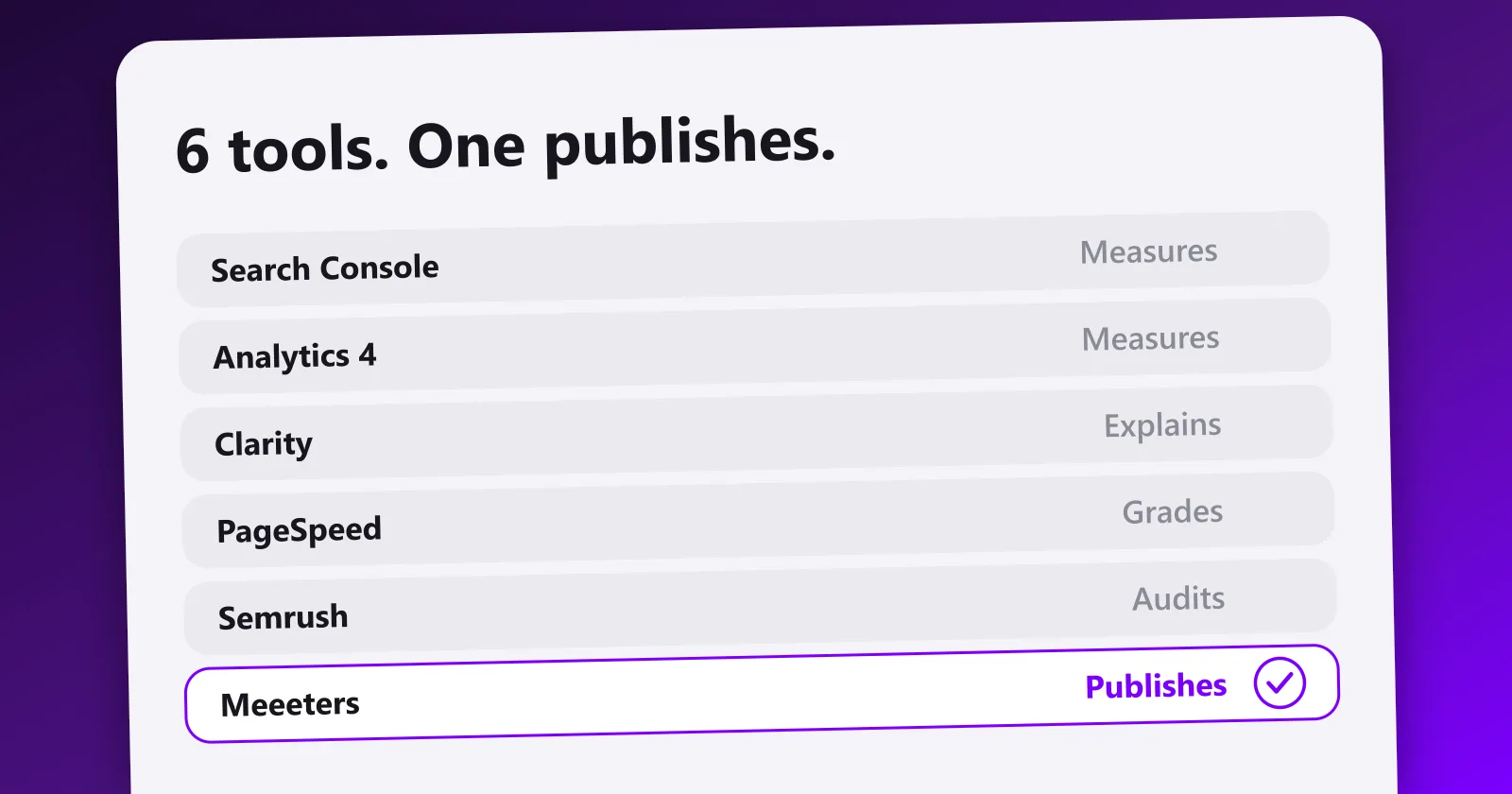
So this is not a ranking. It is the stack I actually run on this site, in the order it runs: measure, understand behaviour, fix the technical, audit deeply, then produce. Five of the six are free. The sixth is the one that does the work the other five only point at.
| # | Tool | The job it does | Price |
|---|---|---|---|
| 1 | Google Search Console | What you rank for, what gets indexed, and now what your social posts do in Search | Free |
| 2 | Google Analytics 4 | What happens after the click | Free |
| 3 | Microsoft Clarity | Why they behaved that way, plus AI citations | Free |
| 4 | PageSpeed Insights | Whether the page is technically in the way | Free |
| 5 | Semrush | The deep audit, once a quarter | Paid |
| 6 | Meeeters | Pruning, writing, publishing | $100/mo Pro after a 3-day trial |
1. Google Search Console: the only source of truth
If you run one tool, run this one. Google Search Console is the only place you see the exact queries you rank for, your real impressions and click-through rates, and your indexing errors, reported by Google itself rather than estimated by a third-party crawler.
Everything else in this list estimates. Search Console knows.
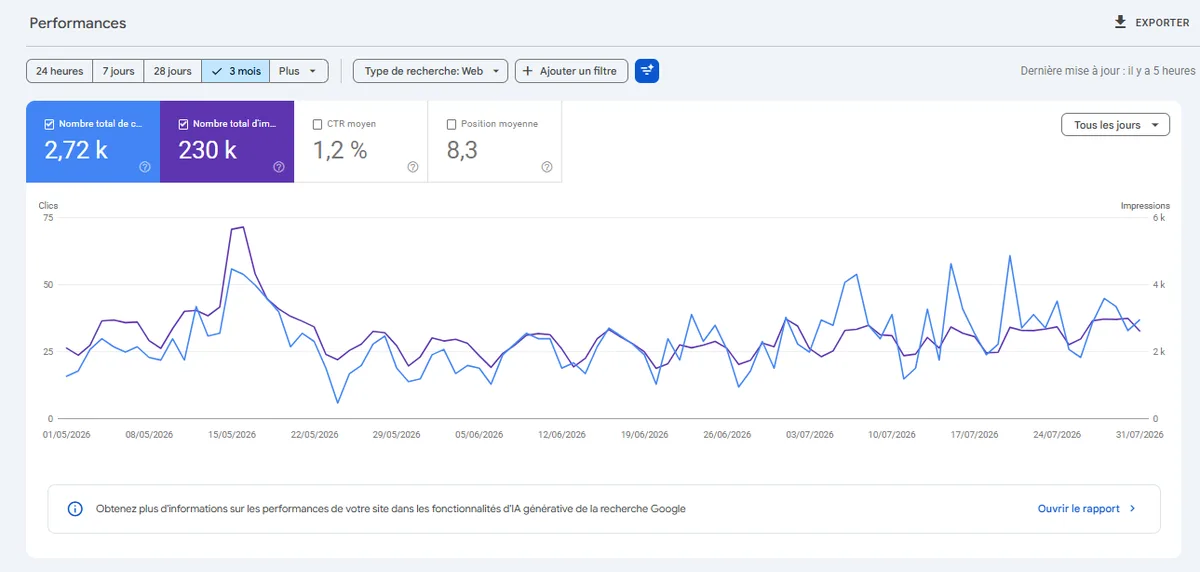
That screenshot is this site over three months. Note the gap between 230,000 impressions and 2,720 clicks: a 1.2 percent click-through rate at an average position of 8.3 is not a content problem, it is a titles and positions problem, and no other tool in this list would have told me that.
What changed in 2026: Google rolled out platform properties on 7 July 2026 and made them globally available on 29 July, which means Search Console now reports the performance of your Instagram, TikTok, X and YouTube content inside Google Search, Discover and News. You do not even need to own a website to use it. That is a genuine shift: the queries pulling people to your video and social posts now sit in the same interface as the ones pulling them to your pages.
The caveat worth stating clearly: this is Google's data about your posts, not native platform data. It will not show you TikTok views or Instagram likes. It shows the slice of that traffic Google sent.
Best for: everyone, without exception. Price: free. What it will not tell you: anything that happens after the click. Start with our Google Search Console guide, and if you want the data outside the interface, export it from the Performance and Indexing reports.
2. Google Analytics 4: what happens after the click
Search Console stops at the click. Google Analytics 4 picks up there: which pages hold attention, which convert, which get abandoned, and where the traffic came from.
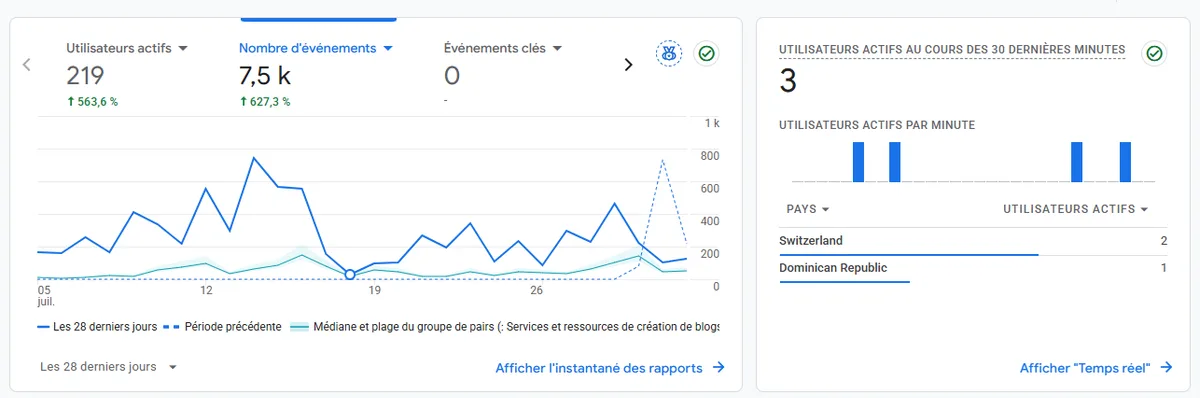
The pairing matters more than either half. A page with high impressions and a poor click-through rate is a title and meta description problem, which is a Search Console diagnosis. A page with strong clicks and no conversions is a page problem, which is an Analytics diagnosis. Same symptom on the surface, two completely different fixes.
GA4 is disliked for a reason: the interface is genuinely hostile compared to Universal Analytics. Build two or three exploration reports once, save them, and stop trying to learn the whole thing.
Best for: understanding whether traffic is worth anything. Price: free. What it will not tell you: why. It shows a 90 percent exit rate without a hint of the cause, which is what the next tool is for.
3. Microsoft Clarity: behaviour, and now AI visibility for free
Microsoft Clarity gives you session recordings, heatmaps, rage clicks and dead clicks, with no traffic cap and no cost. Watching ten real sessions on a page that does not convert teaches you more than a week of staring at bounce rates.
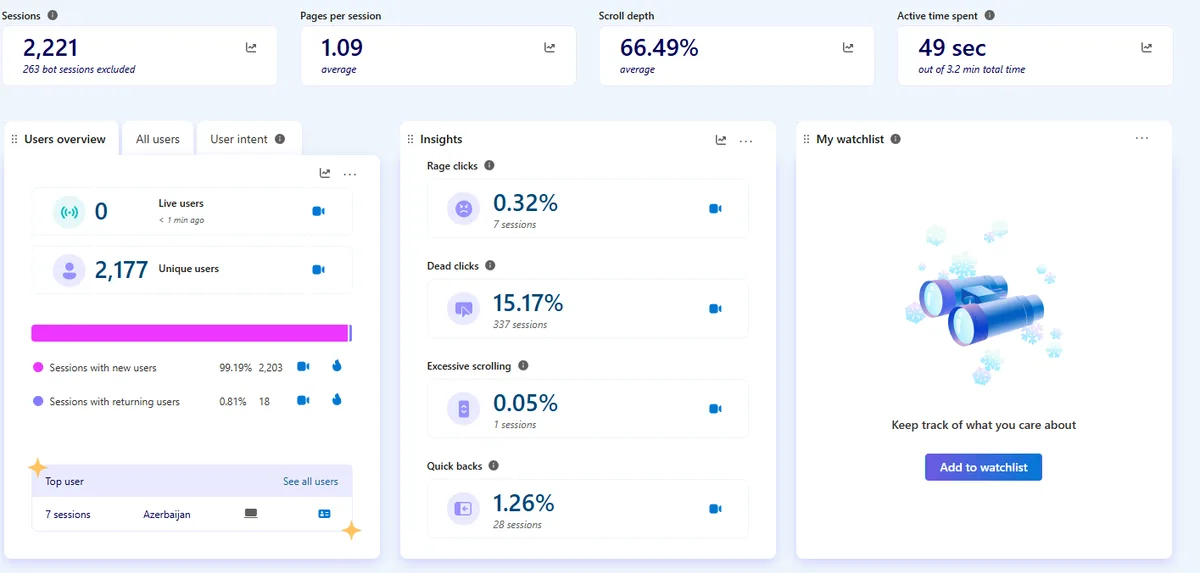
The number that matters in that screenshot is dead clicks at 15 percent, meaning 337 sessions where someone clicked something that was not clickable. Analytics would have shown those sessions as normal.
What changed: Clarity has quietly become a GEO tool. It added AI channel groups in August 2025, separating referrals from ChatGPT, Copilot, Gemini, Claude and Perplexity out of the general "referral" bucket. In January 2026 it added bot activity tracking, which shows which AI crawlers hit your content before any citation happens. And on 13 May 2026, Citations moved out of preview into general availability for every user: the grounding queries, the pages being cited, and your share of authority.
Read that again in pricing terms. Dedicated AI visibility platforms charge a monthly subscription for a narrower version of exactly this. Clarity gives it away because Microsoft wants the behavioural data, which is a fair trade when the alternative is a $99 line item.
Best for: conversion diagnosis, and AI citation tracking without a new subscription. Price: free. What it will not tell you: what to write. For the wider category, see how to rank in AI search and how to get recommended by AI.
4. PageSpeed Insights: put everything at 100
PageSpeed Insights grades your page on performance, accessibility, best practices and SEO. My rule is blunt: get all four to 100.
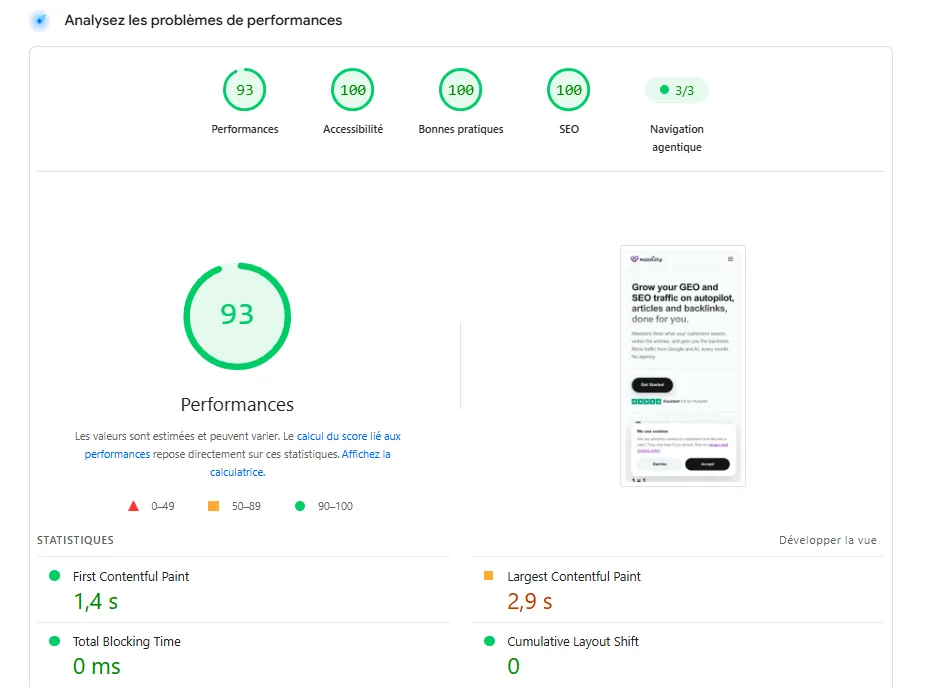
That is this site, and it is a useful example because it is not perfect. Accessibility, best practices and SEO are at 100, and performance sits at 93 with the Largest Contentful Paint flagged at 2.9 seconds, above the 2.5 second threshold. One image on the hero. That is the whole gap, and it is the sort of thing you only chase because you decided 100 was the target.
Here is the honest version, because it matters. The four scores are a lab simulation on a throttled connection, and what Google actually uses for ranking is the field data at the top of the report, real Core Web Vitals from real Chrome users. A 100 in the lab is not a ranking factor.
Chase it anyway. In practice, a site built to score 100 in the lab passes the field thresholds nearly every time, and a site sitting at 60 nearly never does. The score is not the goal, it is the discipline that gets you there: it forces you to stop shipping uncompressed images, blocking scripts, and layout that jumps while it loads. It is also the one number on this list you can move in an afternoon.
Best for: catching the technical problems that quietly cap everything else. Price: free. What it will not tell you: whether the page deserves to rank at all. More detail in the site speed step of a technical audit and the technical SEO audit guide.
5. Semrush: the deep audit, not the permanent subscription
The four tools above tell you what is happening. None of them crawls your whole site and hands you a prioritised list of what is broken across every URL. Semrush does, along with competitor keyword data you cannot get anywhere free.
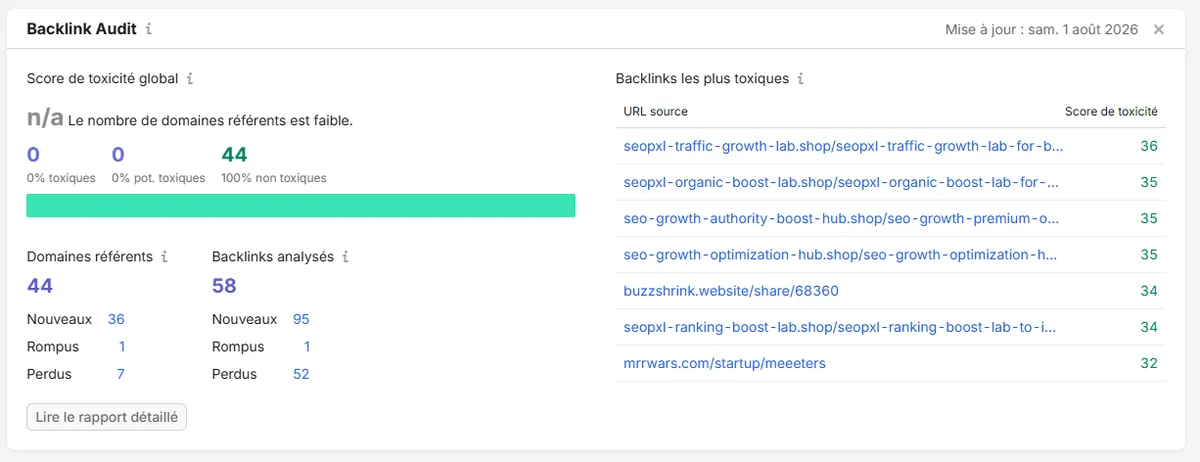
Its backlink audit is the part I keep coming back to. In that report, the spammy auto-generated domains at the top of the toxic list are links nobody asked for, and knowing they exist is worth more than the score itself.
How I use it is the part most reviews leave out: as an audit, not a subscription. Run the site audit, export the findings, work through them, and stop paying until the next one is due. Paid suites are built around the assumption that you will keep the seat all year and check it monthly. If you are a small team, you will not, and $140 a month for a report you read once is a spending pattern rather than a tool problem.
Its limit is the limit of every audit tool: it stops at the report. It will tell you that 43 pages have thin content and hand all 43 back to you to rewrite. We went into this in detail in our alternatives guide.
Best for: a quarterly deep audit and competitor research. Price: roughly $140 a month, worth taking in bursts.
What all five have in common
Line them up and the pattern is impossible to miss. Search Console reports. Analytics reports. Clarity reports. PageSpeed grades. Semrush audits.
Five tools, zero pages published.
That is not a criticism, it is the category. These are instruments. They are supposed to measure. But it explains the thing I see constantly in small teams: four dashboards, a backlog of 200 known issues, and a blog whose last post is from March. More measurement will not fix that, and a sixth dashboard makes it worse by adding findings nobody has capacity to act on.
Diagnosis is not treatment. At some point, something has to write the page.
6. Meeeters: the tool that does the work
This is our product, so treat the section accordingly. It is on the list because it is the only slot in my stack that produces output instead of information, and I would not run the other five without it.
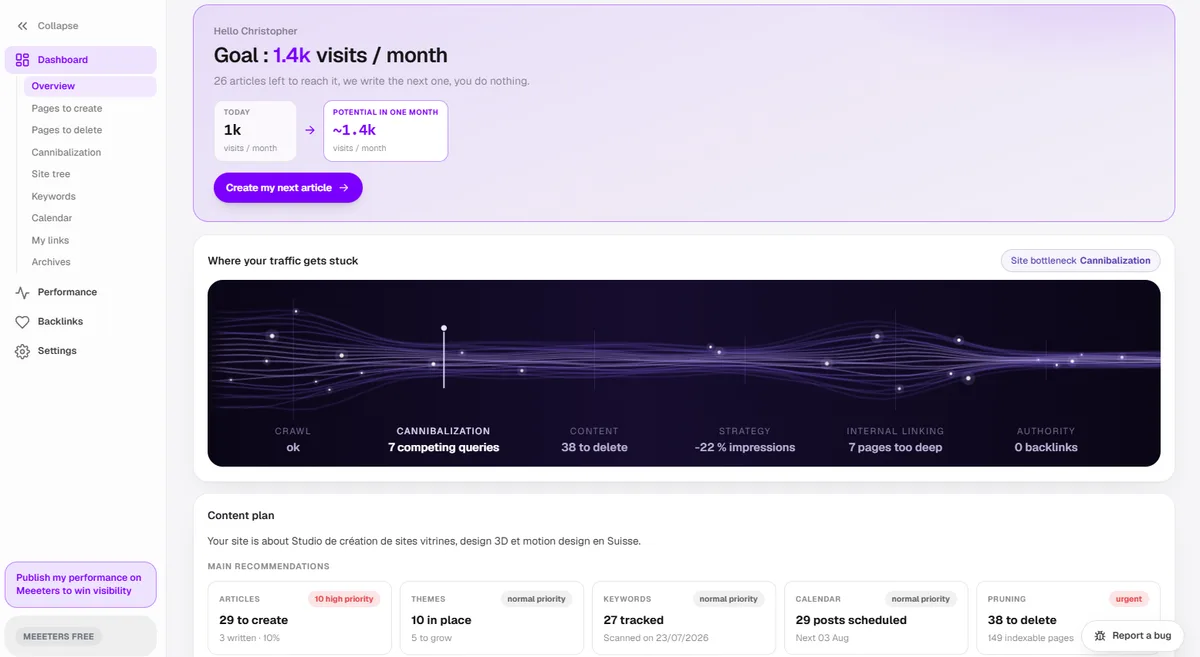
Two jobs specifically:
Pruning. Most sites do not need more articles, they need fewer and better. The audit surfaces the pages that are thin, duplicated, or competing with each other for the same query, which is the input to the decision to merge, rewrite or delete. Cannibalisation is the single most common problem on sites over 50 pages, and it is invisible in Search Console until you go looking for it. The screenshot above is a real account: 7 competing queries and 38 pages worth deleting, on a site of 149 indexable pages. See keyword cannibalization and how to update old content for the manual version of this.
Writing and publishing. The audit picks the keywords worth targeting from what your site already covers, the articles get drafted inside the right silo with internal links already placed, and they publish to your CMS. The part that stays human is review, which is the part that should stay human.
| The other five | Meeeters | |
|---|---|---|
| Output | Reports, scores, issue lists | Published pages |
| Keyword selection | You, from a spreadsheet | Picked from your own site audit |
| Writing | You | Drafted, in your silo structure |
| Publishing | You, by hand | To your CMS |
| Internal linking | You | Placed on publish |
| Price | Free, plus roughly $140/mo for the audit | $100/mo Pro after a 3-day trial |
The honest caveat: it does not replace Search Console or Clarity, and it is not trying to. You still need the instruments. What it replaces is the eight hours a week between reading a finding and having a page live.
The order to add them in
Not all at once. In this order, and only move on when the previous one is actually being used:
- Search Console. Day one, before anything else. If you have not verified your domain, nothing else on this list matters.
- PageSpeed Insights. One afternoon. Fix what it flags, then forget it for six months.
- Analytics 4. Once you have enough traffic for the numbers to mean something. Below roughly 100 visits a week, it is noise.
- Clarity. As soon as you have a page you want to convert, and now also as your free AI citation tracker.
- Meeeters. When the bottleneck stops being "what is wrong" and becomes "who writes it".
- Semrush. Last, in bursts, when the site is big enough that a full crawl finds things you did not already know.
Most people do this backwards. They buy the $140 audit first, get 200 findings, act on none of them, and conclude SEO does not work.
What I deliberately do not run
- Rank trackers. Search Console gives you real average position on real queries. A tracker gives you a simulated position on a list of keywords you chose, which is a worse number you pay for.
- Standalone AI visibility platforms. Clarity Citations covers the job free. Revisit if you need competitor-level AI share of voice, which most sites do not.
- A separate AI writing tool. A writer with no knowledge of your site produces articles that duplicate pages you already have and link to nothing. Context is the whole game.
- Backlink monitors, as a subscription. Ahrefs Webmaster Tools is free on your own verified domain. Use the free-tier stack before adding another subscription.
Where to start
If your stack is currently Search Console and nothing else, add PageSpeed Insights and Clarity this week. Both are free, both take fifteen minutes, and together they will explain most of what is happening on your site.
If you already have all five instruments and your traffic is flat anyway, adding a sixth will not help. That is a production problem, not a measurement problem. Run a free analysis to see which pages your site is missing and which existing ones are competing with each other, then decide whether the missing piece is more data or someone to write.
Frequently asked questions
Quick answers to the questions people ask most about this topic.
For most sites: Google Search Console (queries, indexing and now social and video performance), Google Analytics 4 (behaviour after the click), Microsoft Clarity (session recordings plus free AI citation tracking), PageSpeed Insights (technical performance), and one audit tool such as Semrush run periodically rather than kept year-round. Five of those are free. The paid slot is better spent on execution than on a fifth source of data.
Four free ones cover measurement, behaviour, technical health and AI visibility. Beyond that, adding tools stops helping, because every extra tool produces more findings and none of them produce pages. If you already have a backlog you have not acted on, a sixth dashboard will not move your traffic.
Yes, and it is free with no traffic cap. Beyond heatmaps and session recordings, Clarity added AI channel groups in 2025 to separate ChatGPT, Copilot, Gemini, Claude and Perplexity referrals, and made its Citations report generally available in May 2026, showing which queries ground answers on your pages. Dedicated AI visibility trackers charge a monthly fee for a narrower version of that.
You do not need it, but aiming for it is the cheapest discipline in SEO. The score is a lab simulation, and what Google actually uses for ranking is the field data in the Core Web Vitals report. In practice, a site built to score 100 in the lab almost always passes the field thresholds, and a site that scores 60 almost never does.
As a permanent subscription, often not. As a periodic deep audit, it is excellent: run it, export the findings, fix them, cancel until the next quarter. The trap is paying $140 a month for a report you read once, which is a spending pattern, not a tool problem.
A tool gives you information: rankings, errors, keywords, scores. Automation removes the step after the information: choosing the page, writing it, publishing it. Almost every product on a best-SEO-tools list is in the first category, which is why teams with five tools still have an empty publishing calendar.

I built Meeeters to make link building safe and simple: real, relevant backlinks with no reciprocal footprint and no black-hat shortcuts.
Related searches, answered
What people actually type before landing here, with the short answer and where to read more.
- SEO ranking tools
- Rank trackers report an average across locations and devices, so treat their positions as a trend, not a fact.Positions straight from Google ›
- SEO tracking tools
- Search Console is the only free source of your real impressions and queries, and it is the one to start from.The complete GSC guide ›
- SEO measurement tools
- Measure business outcomes over rankings: a page at position 8 with clicks beats a position 3 nobody opens.KPIs worth keeping ›
- SEO reporting tools
- Reporting is the easiest part of the stack to automate, since the inputs never change month to month.Automating the report ›
- SEO tracking software
- Before buying, check the tool exports raw data. A dashboard you cannot export is a dead end at the first audit.A report that is actually useful ›
- New SEO tools
- Most new entrants wrap the same three data providers. Ask whose index it is before comparing prices.What free audit tools hide ›
- Best SEO metrics software
- One crawler, one keyword source and Search Console cover the vast majority of decisions.Running a crawl that finds real problems ›
- Do you need paid SEO tools to rank?
- No. Free tiers plus Search Console are enough under a few hundred pages; paid tools buy speed, not rankings.Research without expensive tools ›