Backlink Spam Checker: Real Risk, Toxic Links, and a Disavow-Ready Export

Run a full backlink spam check on any domain in seconds. Get a toxicity score, see exactly which links are dragging you down, and export a clean disavow list without switching between five different tools.
Backlink spam checker that shows you the real risk, not just a number
Most backlink checkers tell you a domain is "spammy" and leave you guessing what to do next. This one works differently. Paste any URL, and you get a toxicity score built from link patterns, anchor text distribution, and source authority signals, plus a clear breakdown of which specific backlinks are harmful and why. You stop auditing and start fixing.
What you actually get from a spam check
A toxicity score that means something. The score is calculated from multiple signals: the ratio of exact-match anchor text, the proportion of links from sites with thin content, and the velocity of link acquisition. You see the number and the reasoning behind it.
A prioritized list of toxic links. Not every bad link is equally dangerous. The checker ranks each backlink by risk level, so you know which ones to disavow first and which ones are borderline enough to leave alone.
A disavow-ready export. One click generates a properly formatted disavow file for Google, with the toxic links separated from the questionable ones. No manual copy-pasting, no formatting errors.
A comparison against your competitors. See whether your backlink profile has more spam signals than the sites you are trying to outrank. This tells you if a cleanup alone can move your rankings, or if you also need to build new, clean links.
A clear answer to "is this link hurting me?" Each flagged backlink comes with a short explanation: what makes it risky, whether it looks like a paid link pattern, or whether it is just low quality but harmless.
What a real audit looks like in Meeeters
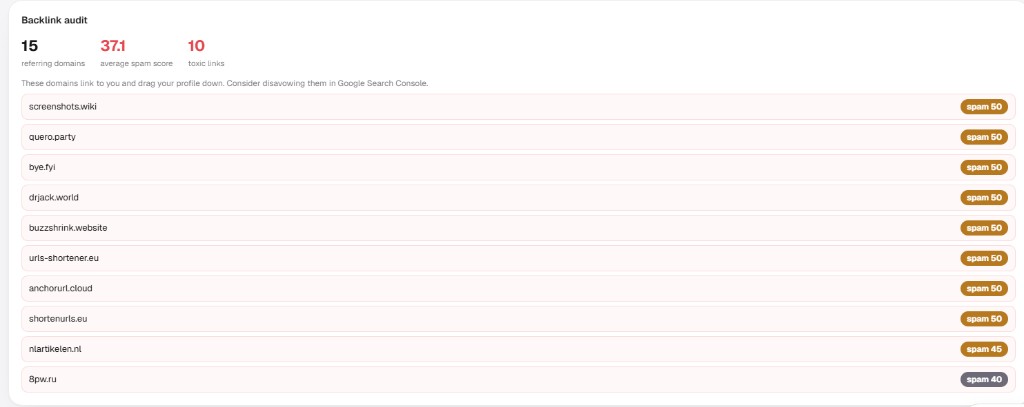
Connect Search Console and the backlink audit surfaces referring domains, an average spam score, and the domains Google would rather you did not inherit. Here is a live example: 15 referring domains, average spam score 37.1, 10 links flagged toxic, each with a spam score badge so you can triage before you touch the disavow tool.
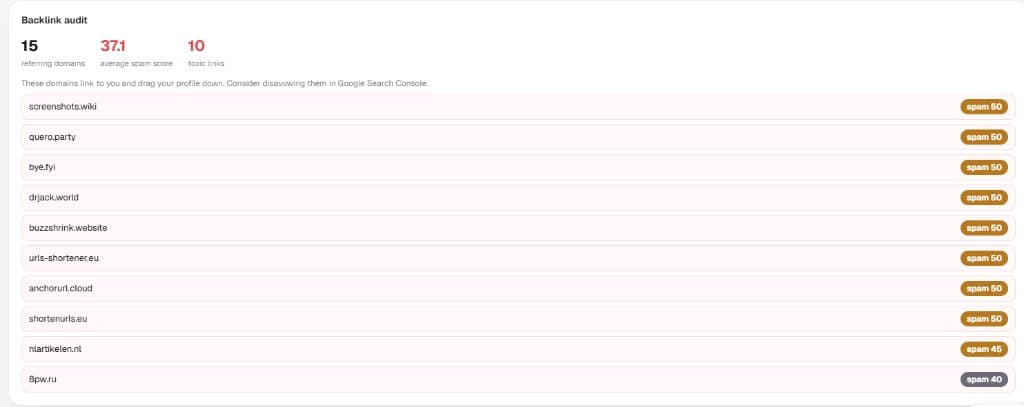
The domains at the top of the list are not random noise from a third-party toxicity dashboard. They are the ones that pattern-match spam footprints: shortener farms, auto-generated wikis, and domains that exist mainly to pass links. That is the difference between a score you panic over and a short list you can actually act on.
Treat the audit as a triage pass: export the toxic domains, note the anchor patterns, decide whether each cluster is noise Google already ignores or evidence of a scheme you participated in. The monitoring habit (monthly diff of referring domains, alert on spam bursts) matters more than any one-off score.
How the spam check works
Step 1: Enter your domain. The checker crawls your backlink profile and pulls every known link pointing to your site.
Step 2: Review the toxicity breakdown. Links are grouped by risk level, with the scoring factors visible for each one. You see the pattern behind the score, not just a red or green badge.
Step 3: Export and act. Download the disavow file, or send the list to your team. The work is done; you just decide what to submit.
What the full check includes
The complete backlink spam checker runs on any domain, including competitors, and covers:
- Toxicity score with a breakdown of contributing factors
- Risk-level classification for every single backlink
- Anchor text analysis to spot over-optimized patterns
- Source authority check on every linking domain
- Disavow file export in Google's accepted format
- Competitor comparison to benchmark your profile
No credit card, no trial period, no "contact sales" wall. You run the check, you see the results, you decide what to do next.
Link spam and the Google spam updates (including June 2026)
Site owners often conflate "Google rolled a spam update" with "my backlinks are why I dropped." Those are related topics, not the same event.
Google ships spam updates to improve SpamBrain, its automated classifier for pages and sites that violate spam policies. The June 2026 spam update ran from June 24 to June 26 and finished in just over two days, one of the fastest rollouts on record. Google described it as a normal detection refresh: same policies, better recognition of violations like scaled content abuse, cloaking, and scraped pages.
What that update did not do: Google explicitly confirmed it did not target link spam and did not enforce site reputation abuse in that release. Both are handled on their own timelines.
What that does not mean for your backlinks: link spam is still a named policy. SpamBrain neutralizes manipulative links outside named updates, and Google is clear that ranking value from link schemes is not restored once discounted. A June traffic dip on thin templates is a content spam story. A profile built on paid networks and exact-match farms is a link story, and it stays dangerous even when the headline update is about something else.
Practical takeaway for this checker:
- Run the spam check on a schedule, not only after an update headline. Toxic referring domains accumulate quietly; shortener farms and PBN footprints rarely announce themselves.
- Separate algorithmic spam demotions from link risk. If Performance collapsed on June 24–26 across programmatic URLs, read our June 2026 spam update guide. If your audit shows 40% of referring domains are spam-score 50+ shorteners, fix the profile regardless of what shipped that week — and remember that referring domains count differently than raw backlink totals when you read the export.
- Do not disavow because an update happened. Disavow is for documented manipulation or manual action recovery, not for reacting to Search Status Dashboard news.
How to disavow (only when the audit says you should)
Google's position has not moved: most sites should never upload a disavow file. SpamBrain already ignores the random scraper and directory noise pointing at every domain on the internet. Disavow is a last resort when you have a real, identified problem.
When disavow actually makes sense:
- A manual action for unnatural links in Search Console
- A documented history of paid or black-hat links you cannot get removed, cross-referenced with what your audit flagged
When it does not: a third-party toxicity score, a list of "spam 50" domains you never bought links from, or panic after reading about a spam update. Most of those scores confuse low DR with manipulation; treat the export as a hypothesis, not a disavow shopping list.
If you qualify, the process is short:
- Export your toxic list from the spam check (domain-level entries are usually enough).
- Build a plain-text file with one line per domain:
domain:example-spam.tld - Open Search Console → Links → Disavow links → upload for the correct property.
- Wait weeks to months. There is no confirmation email. For manual actions, file a reconsideration request only after the file is uploaded and the paid links are gone or disowned.
Example snippet from a disavow file built off the audit screenshot above:
domain:screenshots.wiki
domain:quero.party
domain:bye.fyi
domain:drjack.world
domain:buzzshrink.website
Do not paste every domain a tool paints red. Match the file to the pattern your audit documented: the shortener cluster, the paid network, the scheme you participated in. Everything else is noise Google already discounted.
Why this checker will not waste your time
The biggest frustration with spam checkers is false positives. You get a list of hundreds of "toxic" links, and half of them are forum profiles from a legitimate outreach campaign you ran last year. This checker separates actual spam signals from low-authority but harmless links. It flags patterns that match Google's documented violations: link schemes, paid link networks, and automated link exchanges.
A link from a small blog that nobody visits is not the same as a link from a site that exists only to pass link juice. The checker knows the difference, and it is worth comparing it against what other backlink checkers actually measure before you trust a red badge.
If you have ever spent hours manually reviewing a disavow list, you understand why a short, pattern-based export beats a 600-line toxicity dump. For the manipulation patterns worth knowing before you flag anything, see toxic backlinks and bad SEO.
Run your backlink spam check now
Paste your domain and see your toxicity score immediately. No sign-up required to start. If the results show a problem, you get the disavow file ready to go. If they show a clean profile, you have the confidence to focus on earning links instead of cleanup — start with a free SEO analysis on your domain.
Frequently asked questions
Quick answers to the questions people ask most about this topic.
A low-quality link comes from a weak site but does not actively hurt you. A toxic link comes from manipulative patterns (paid networks, link schemes, spam footprints) that Google's systems are built to neutralize or penalize.
No. Disavow removes negative signal; it does not rebuild lost authority. Clean first, then earn legitimate links. Most sites never need disavow at all unless Google issued a manual action.
Yes. Enter any domain. Comparing spam density against sites you outrank tells you whether cleanup alone can move the needle or you also need new links.
Google confirmed that update did not target link spam. Link schemes remain a named policy and SpamBrain still neutralizes manipulative links continuously. A spam check is insurance, not a reaction to that rollout.

I built Meeeters to make link building safe and simple: real, relevant backlinks with no reciprocal footprint and no black-hat shortcuts.
Related searches, answered
What people actually type before landing here, with the short answer and where to read more.
- Toxic backlink checker
- Toxicity is a vendor opinion, not a Google signal. Treat a high score as a prompt to look, not as proof of harm.What Google actually punishes ›
- Bad backlinks checker
- Most bad links are simply ignored. The ones that hurt are the ones you paid for or built in a pattern.The white-hat guide ›
- Spam backlink checker
- Sudden spikes of links from unrelated languages or niches are the clearest spam pattern worth investigating.When links vanish ›
- Check bad backlinks
- Sort by referring domain, not by link, or one spammy site with 5,000 sitewide links will swamp the whole review.Auditing step by step ›
- Backlink spam
- Negative SEO through spam links is rare. Google's own guidance is to ignore them unless you have a manual action.Why you probably should not disavow ›
- Spammy backlink checker
- Check whether the linking page is indexed at all: an unindexed page passes nothing, good or bad.How indexing decisions work ›
- Toxic backlinks check
- Screen before you place, not after. Vetting the site upfront is far cheaper than cleaning a profile later.Screening out toxic sites ›
- Bad backlink checker tool
- No tool sees Google's evaluation. The honest use is triage: surface the outliers and judge them yourself.What an audit really covers ›